Drawing automata
Every automaton, weighted automaton and graph describes itself in the language of
Graphviz with to_dot(). Two functions draw it, with the Graphviz program dot :
autolib.to_svg(automaton, highlight=None)returns the drawing as SVG text;autolib.render(automaton, path, highlight=None)writes it to a file, whose extension gives the format :.svg,.png,.pdf…
highlight is a path, WeightedPath or MultiWeightedPath, or a list of edges : it is drawn in colour, with
its states.
Graphviz installs apart from Python : apt install graphviz, brew install graphviz, conda install graphviz,
winget install graphviz, or from graphviz.org.
In Jupyter
An automaton alone in a cell shows its drawing when Graphviz is installed, and its text otherwise :
from autolib import Automaton
Automaton("(0|1)*0(0|1)")
An automaton
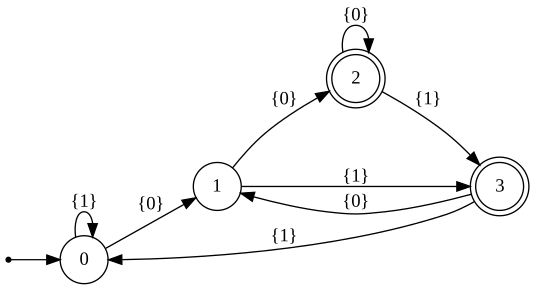
Double circles are the accepting states, the point leads to the initial state, and the labels are sets of symbols.
import autolib
from autolib import Automaton

a = Automaton("(0|1)*0(0|1)")            # the second symbol from the end is 0
autolib.render(a, "automaton.svg")
A weighted automaton and its best path
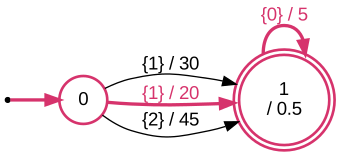
Edges show symbols / cost, accepting states their final cost. Parallel edges stay distinct : the bus and the
bike both read 1.
import autolib
from autolib import WeightedAutomaton

b = WeightedAutomaton.Builder()
home, work = b.add_state(), b.add_state()
b.set_initial(home)
b.set_accept(work, 0.5)                   # final cost
b.add_transition(home, work, 1, 30.0)     # bus
b.add_transition(home, work, 1, 20.0)     # bike
b.add_transition(home, work, 2, 45.0)     # on foot
b.add_transition(work, work, 0, 5.0)      # coffee
commute = b.build()

best = commute.best_word_of_length(2)                   # [1, 0] : bike, then coffee
autolib.render(commute, "best_path.svg", highlight=commute.best_path(best))
Epsilon edges
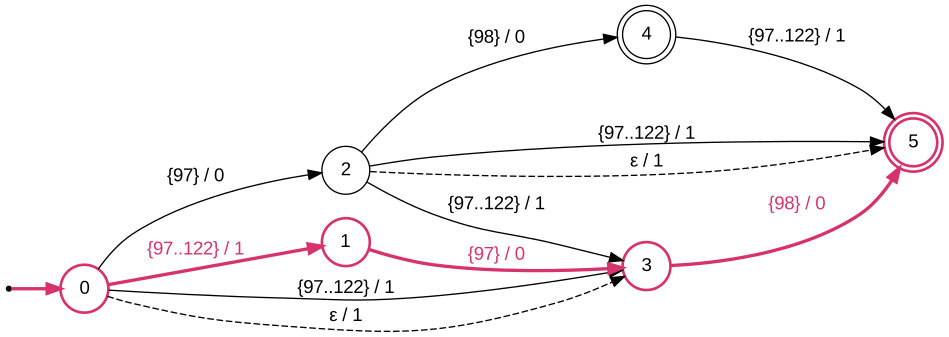
Epsilon edges, reading nothing, are dashed. Here the automaton of the words at most one edit away from ab,
the path of xab highlighted : an insertion, then two matches.
import autolib
from autolib import IntervalSet, WeightedAutomaton

letters = IntervalSet(range(ord("a"), ord("z") + 1))
target, b = "ab", WeightedAutomaton.Builder()
state = {(i, e): b.add_state() for i in range(len(target) + 1) for e in range(2)}
b.set_initial(state[0, 0])
for (i, e), s in state.items():
    if i == len(target):
        b.set_accept(s)
    if i < len(target):
        b.add_transition(s, state[i + 1, e], ord(target[i]), 0.0)        # match
    if e == 0:
        b.add_transition(s, state[i, 1], letters, 1.0)                   # insertion
        if i < len(target):
            b.add_transition(s, state[i + 1, 1], letters, 1.0)           # substitution
            b.add_epsilon(s, state[i + 1, 1], 1.0)                       # deletion, dashed
typos = b.build()

closest = typos.best_path([ord(c) for c in "xab"])     # one insertion
autolib.render(typos, "edit_distance.svg", highlight=closest)
Several costs
Edges show their vectors of costs. Here the fastest journey of the Pareto front :
import autolib
from autolib import MultiWeightedAutomaton

b = MultiWeightedAutomaton.Builder(2)                    # minutes, euros
home, station, office = b.add_state(), b.add_state(), b.add_state()
b.set_initial(home)
b.set_accept(office)
b.add_transition(home, station, 0, [15, 0])              # walk
b.add_transition(home, station, 0, [5, 8])               # taxi
b.add_transition(station, office, 0, [40, 4])            # slow train
b.add_transition(station, office, 0, [20, 15])           # fast train
journey = b.build()

fastest = min(journey.pareto_front(), key=lambda path: path.cost(0))
autolib.render(journey, "pareto.svg", highlight=fastest)

Other tools
to_dot() is plain text : the Python package graphviz, NetworkX (nx.nx_pydot.read_dot) or any Graphviz viewer
read it.
from autolib import Automaton
print(Automaton("12*").to_dot())